Hackathon · · 3 min read
EcoCart: reading an Amazon cart for an AI
My part of a MakeUC 2025 winner: a Chrome extension that scrapes the cart, fills in missing product details and hands clean data to the AI.
In short
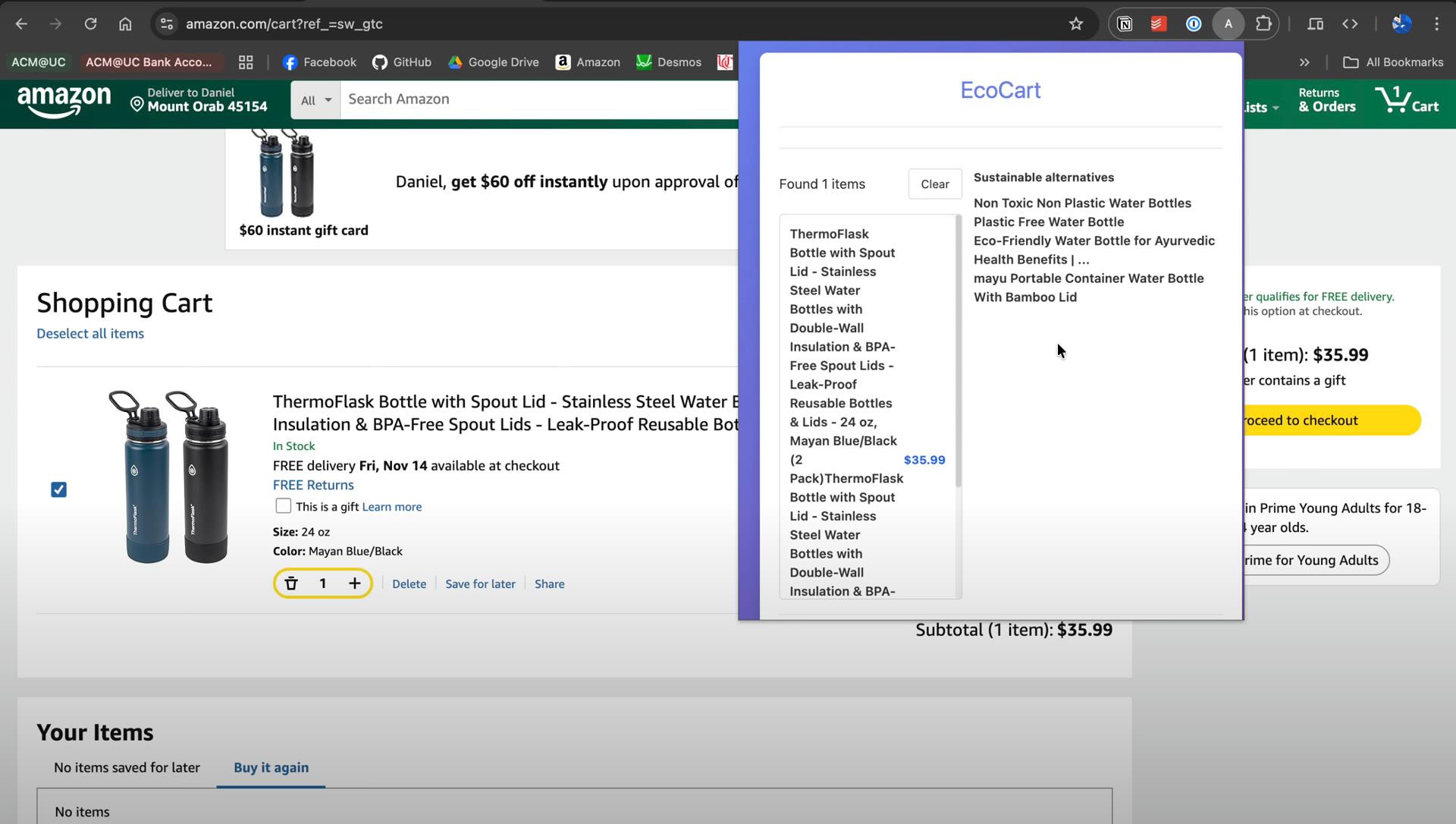
EcoCart is a Chrome extension my team of four built in 24 hours at MakeUC 2025. It reads your Amazon cart and suggests alternatives that are cheaper and more sustainable, and it took Second Place, Best Green Tech Hack and MLH Best Use of Gemini API. My part was the extension's interface and the scraper: getting clean product data out of a real shopping page so the AI had something good to work with.
Online shopping makes it easy to fill a cart and hard to know which products are actually worth buying, for your wallet or for the planet. Comparing prices and sustainability takes research nobody wants to do at checkout. Our idea was to do that research for you, right on the cart page.
It was the first Chrome extension any of us had built.
Finding the products
An extension sees the same page you do, so the first job is reading it. A content script runs on the cart page and walks every cart row, pulling out the title, the price and Amazon's product ID, the ASIN.
const SELECTORS = {
  cartItems: "div.a-row.sc-list-item",
  title: "a.sc-product-link.sc-product-title span.sc-grid-item-product-title",
  price: "div.sc-apex-cart-price span.a-offscreen",
};
Rows without a title are skipped: the cart page is full of empty containers that match the same selectors.
The ASIN is the key
The ASIN is what lets us look a product up again, so losing it means losing the item. It doesn't always sit in the same place, so the scraper tries four ways in order: an attribute on the row itself, a child element that carries it, the product link's URL, and finally any element in the row that has one.
const m = href.match(/\/dp\/([A-Z0-9]{10})/) || href.match(/\/gp\/product\/([A-Z0-9]{10})/);
Cart rows don't describe products
A cart row says what a product is called, not what it's made of, and the AI needs more than a title to judge sustainability. So for any item without a useful description, the extension fetches that product's own page in the background, parses it, and tries a list of places Amazon puts product details, from the feature bullets to the description and the overview. Text that turns out to be an ad ("limited time deal", "shop now") is skipped, and the page's meta description is the last resort.
To keep this fast and polite:
- Results are cached per ASIN, including misses, so nothing is fetched twice.
- Three workers share the queue, so a big cart doesn't fire dozens of requests at once.
- Every request gives up after 15 seconds.
The finished list goes to the extension's background script, which sends it to our backend.
What happens next
The backend turns messy product names into something searchable. A zero-shot classifier on Hugging Face sorts each product into a category, and Gemini boils the name down to a single search word. A product search builds a pool of possible alternatives, Gemini runs a grounded search on how each manufacturer operates to produce a sustainability score, and Gemini embeddings in a Zilliz vector database find related products. The popup then shows which options give the best balance of price and sustainability.
What was hard
Connecting everything. A Chrome extension is really three programs: the popup you click, the content script living inside the shopping page, and a background script in between, and they only talk through messages. Getting data to flow cleanly between them, and deciding where results should be stored, was our main challenge. We came out knowing how manifests and permissions fit together, and how to put the Gemini API to work inside an extension.
What's next
Real sustainability data instead of search-based estimates, saved results, personal tips, and support for shopping sites beyond Amazon.
Related projectEcoCart – AI Shopping ExtensionRead case study →